How to Improve Your Cad Rendering Skills for Stunning Visuals
In the realm of architecture and design, mastering Cad Rendering has become essential for creating impressive visuals. Industry reports indicate that high-quality renderings can boost project approval rates by over 40%. As technology advances, the demand for stunning Cad Renderings grows.
One expert, Dr. Mark Thompson, a leading authority in digital visualization, highlights the importance of continual learning in this field. He states, “Perfecting Cad Rendering techniques is a journey, not a destination.” This sentiment underscores the need for ongoing skill enhancement.
Mistakes often emerge when designers overlook the fundamentals of light and texture. An eye for detail is necessary but not always cultivated. With a commitment to refining one’s Cad Rendering abilities, designers can elevate their work to new heights. Embracing this challenge can lead to extraordinary results.
Understanding the Basics of CAD Software for Rendering
Understanding CAD software is essential for creating stunning 3D visuals. Many users dive straight into complex features without mastering the basics. It's crucial to familiarize yourself with the interface first. Spend time exploring menus and tools. This foundational knowledge will enhance your efficiency later on.
Learning key functions, like modeling and texturing, is vital. Practice manipulating shapes and applying materials. Experiment with simple projects before tackling more intricate designs. Don't shy away from mistakes. They offer valuable learning experiences. Observe where your designs fall short and make those areas your focus.
Rendering requires an understanding of lighting and camera angles. These elements can dramatically change a scene’s mood. Take time to adjust your settings and see how light interacts with surfaces. Reflect on your work and seek feedback to refine your skills. Embrace each challenge as an opportunity for growth.
How to Improve Your Cad Rendering Skills for Stunning Visuals
| Dimension |
Description |
Example Tools |
Improvement Tips |
| Lighting |
Understanding how to use light effectively in a scene. |
3ds Max, Blender, Cinema 4D |
Experiment with different light types and intensities. |
| Textures |
Applying materials and textures to enhance realism. |
Substance Painter, Photoshop |
Use high-resolution texture maps and adjust UV mapping. |
| Rendering Settings |
Configuring parameters for optimal output quality. |
V-Ray, Arnold, Keyshot |
Adjust resolution and quality settings based on requirements. |
| Post-Processing |
Editing the final output for enhancements. |
Adobe After Effects, Lightroom |
Apply color correction and effects for a polished look. |
| Camera Angles |
Choosing the right perspective for rendering. |
Any CAD Software with camera tools |
Test multiple angles to find the most compelling view. |
Exploring Essential Tools and Features for Enhanced Visuals
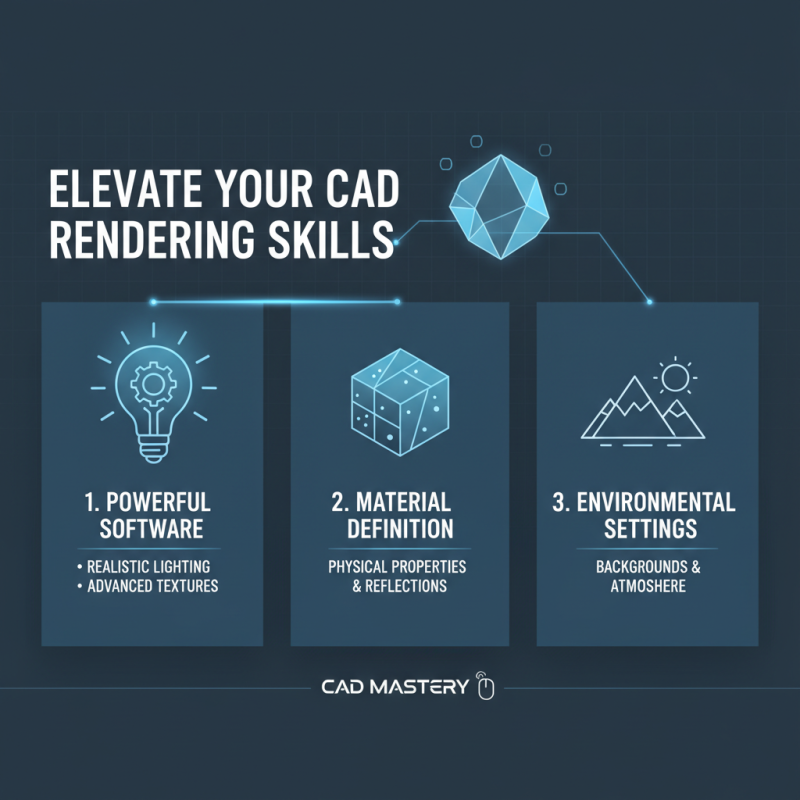
To enhance your CAD rendering skills, focus on the tools you use. A powerful rendering software is essential. Look for features like realistic lighting and advanced texture mapping. These can significantly elevate your visuals. Pay attention to environmental settings as well. The right background can add depth to your renderings.
Experiment with different materials. Wood, metal, and glass all have unique properties. Understanding how they interact with light is crucial. It's easy to overlook details like reflection and refraction. These elements can make your renders feel more lifelike. Don't shy away from experimenting; sometimes, imperfections can drive creativity.
Feedback is invaluable. Share your work with peers and listen to their insights. Critiques can reveal aspects you may have missed. Self-reflection is key to improvement. Review your old projects to see growth and areas that need work. Each rendering is a chance to learn, so seize it.
Techniques for Effective Lighting and Shadows in CAD Renderings
Effective lighting and shadows are crucial for stunning CAD renderings. They add depth, realism, and emotion to your visuals. When applying light, consider the direction. A light source can drastically change how objects appear. Natural light from a window can create soft, flattering shadows. In contrast, overhead lights produce harsher lines. Experiment with these settings to see what fits your project best.
Shadows play a vital role in anchoring objects to the ground. Without them, a rendering can look flat and lifeless. Use variations in shadow intensity to simulate different times of day. Early mornings provide gentle shadows, while noon yields stark contrasts. However, be mindful of overdoing it. Shadows that are too dark or too sharp can detract from the overall quality.
Remember that balance in lighting is key. Too much brightness can wash out details, while too little can hide important features. Test your settings frequently. Reflect on how light interacts with materials. You might discover unexpected results. Embrace imperfections and learn from them. Each mistake can lead to growth and improvement in your skills.
Improvement in CAD Rendering Skills Over Time
Optimizing Textures and Materials for Realistic Effects
When working on CAD rendering, textures and materials play a crucial role. Realistic effects hinge on how well you optimize these elements. Start by choosing the right texture maps. They should match the material's characteristics. For example, wood should have grain details, while metal should reflect light.
Tip: Always use high-resolution images for your textures. Low-quality images will show flaws in close-ups. However, be careful not to overwhelm your rendering with too many details. Balance is key. You might end up with a cluttered look.
Experiment with transparency effects. This can enhance realism. Adjust the opacity of materials like glass or water carefully. Too much transparency may flatten your visuals, diminishing depth.
Tip: Use basic shaders to mimic real surfaces. Remember that not every material will look perfect right away. It takes time to find the right balance for light and shadow. Review your work and adjust textures until they truly resonate with your vision.
Evaluating and Iterating on Rendered Designs for Improvement
When evaluating rendered designs, critical analysis is essential. Look closely at lighting and textures. Are they realistic? Input from peers can provide fresh perspectives. Share your work with others, inviting constructive feedback. This process reveals elements you might overlook, such as odd shadows or misplaced details.
Iterating on your design is where improvement happens. Make small adjustments based on the feedback. Perhaps the colors are off. Or the viewpoint doesn’t highlight your concept effectively. Use this iterative process to refine each design. It’s important to recognize that not every render will be perfect. Embrace the imperfections as opportunities for growth. Adjustments will lead to more polished results over time.
Consider creating multiple versions of a single scene. This helps in exploring different techniques. Take a risk and try unconventional methods. You might stumble upon an unexpected solution. Continuous evaluation shapes your skills and enhances your final visuals. Each iteration propels you forward in your rendering journey.