

Inquiry
Form loading...
conatctz48
contact US

Top Tips for Stunning Cad Rendering Techniques and Software Options

In the world of architectural visualization and design, CAD rendering plays a pivotal role in transforming intricate technical drawings into visually stunning representations. As the demand for captivating images grows, mastering CAD rendering techniques becomes essential for designers and architects alike. This introduction focuses on the importance of not only understanding the foundational principles of CAD rendering but also exploring the latest software options that enhance the creative process.

Effective CAD rendering combines artistic vision with advanced technology, allowing designers to showcase their work in vivid detail. From establishing realistic lighting and shadows to incorporating textures that bring materials to life, the right techniques can elevate a project from mere concept to breathtaking visual reality. Moreover, the continuously evolving landscape of CAD software provides a plethora of tools and features that streamline the rendering process, making it more accessible and efficient.

This guide aims to provide readers with valuable tips and insights into the most effective CAD rendering techniques and the software options available today. Whether you are a seasoned professional or just beginning your journey in architectural design, mastering these skills will enable you to produce stunning visualizations that communicate your ideas effectively and leave a lasting impression.

Top Tips for Stunning Cad Rendering Techniques and Software Options

Understanding CAD Rendering: An Overview of its Importance and Applications
Top Tips for Stunning Cad Rendering Techniques and Software Options

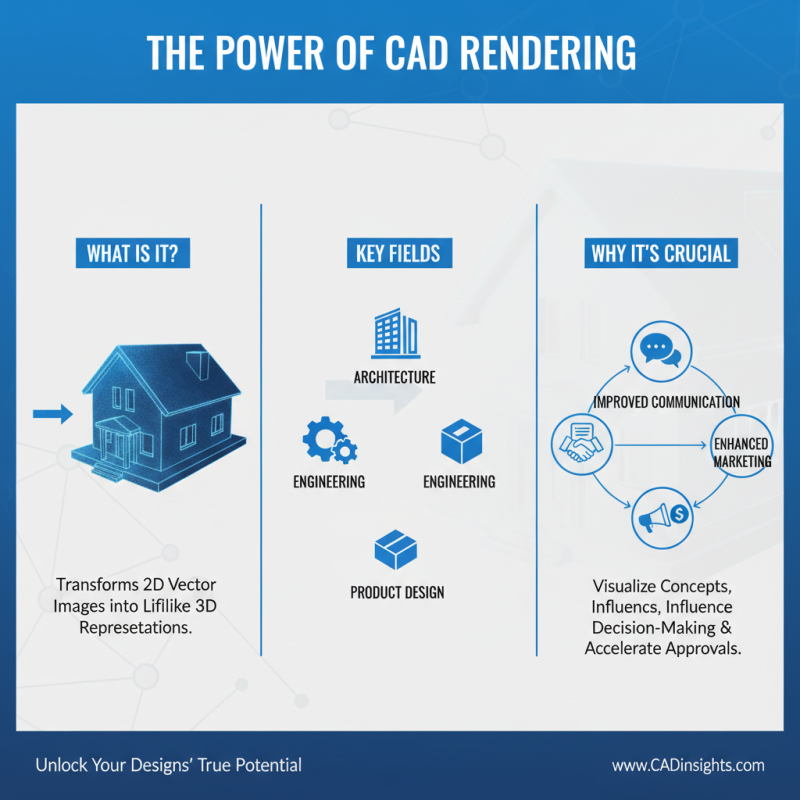
Computer-Aided Design (CAD) rendering is an essential process in various fields, including architecture, engineering, and product design. It transforms 2D vector images into lifelike 3D representations, allowing designers to visualize their concepts more effectively. Understanding CAD rendering is crucial not only for creating stunning visuals but also for improving communication among stakeholders, facilitating client presentations, and enhancing marketing efforts. The ability to see a detailed representation of a project can significantly influence decision-making and project approval processes.

When considering CAD rendering techniques, it’s beneficial to focus on efficiency and quality. One tip is to utilize layers within your software to organize different elements of your design. This practice not only simplifies edits but also helps in managing complex projects. Additionally, experimenting with lighting and shadows in your renders can create depth and realism, making your designs stand out. Lastly, consider integrating textures and materials to add detail and richness, which can enhance the overall aesthetic of your renderings.

Investing time in understanding the applications of CAD rendering can lead to significant improvements in your workflow and end product. Whether you are working on architectural visualizations, product development, or interior design, mastering these techniques will elevate your projects and provide a competitive edge in your field.

Essential Techniques for Achieving Stunning CAD Renderings

Creating stunning CAD renderings involves mastering essential techniques that enhance both the visual appeal and realism of your designs. One of the key techniques is utilizing advanced lighting methods. By experimenting with different light sources, angles, and intensities, designers can create depth and highlight specific features of their models. Moreover, utilizing natural lighting can produce a more lifelike ambiance, which is especially important in architectural renderings.

Another crucial element in achieving impressive CAD renderings is texture application. Applying realistic textures can dramatically transform a basic model into an engaging visual piece. This involves selecting high-resolution textures that accurately represent the materials you wish to depict, whether it's wood, metal, or fabric. Additionally, practicing UV mapping ensures that textures are correctly aligned and scaled to fit your models seamlessly. Combining these techniques—effective lighting and thoughtful texture application—will significantly elevate the quality of your CAD renderings, making them truly stand out.

Top Tips for Stunning CAD Rendering Techniques and Software Options

Technique Description Software Option Usage Scenario
Photorealistic Rendering Creating images that closely resemble real-life photos. Lumion Architectural visualization projects.
Texturing Applying surface materials and textures to 3D models. 3ds Max Product design and visualization.
Lighting Techniques Strategically placing light sources for realistic shadows and highlights. V-Ray Interior rendering projects.
Animation Creating moving presentations of 3D models. Blender Concept demonstrations and walkthroughs.
Post-Processing Editing rendered images to enhance quality. Adobe Photoshop Final touches on rendered scenes.

Choosing the Right Software: Top Options for CAD Rendering

When it comes to CAD rendering, choosing the right software is crucial to achieving stunning visual results. According to the "2023 CAD Software Market Report," the demand for advanced rendering solutions has surged by 15% compared to previous years, driven by industries like architecture and product design. This growth emphasizes the importance of selecting software that not only fits your technical requirements but also enhances your workflow efficiency.

A great tip for professionals is to thoroughly explore the most popular rendering options available. Look for software that offers a user-friendly interface combined with powerful rendering capabilities. Features such as real-time rendering, cloud-based processing, and compatibility with various file formats are essential, especially for teams working on large projects. Furthermore, an integrated rendering solution can significantly reduce the time needed to produce high-quality visuals, allowing for quicker iterations and better client engagement.

Another tip is to utilize online resources, such as tutorials and community forums, to make the most of your chosen software. Engaging with fellow professionals can lead to valuable insights and techniques that elevate your rendering skills. According to recent surveys conducted by industry analysts, 65% of CAD professionals found that active participation in user communities greatly improved their rendering efficiency and creativity. As you refine your skills, remember that practice and exploration are key to mastering CAD rendering techniques.

Advanced Rendering Techniques to Enhance Visual Quality

When it comes to enhancing visual quality in CAD rendering, employing advanced techniques can significantly elevate the impact of your designs. One effective method is the use of photorealistic rendering to create vibrant and lifelike images that resonate with clients and stakeholders. Recent industry data shows that nearly 75% of architects stated that photorealistic renderings increase client understanding and satisfaction, leading to more successful project approvals. By focusing on accurate lighting, realistic materials, and detailed textures, designers can produce renders that not only reflect vision but also showcase the intricate details within their projects.

To achieve stunning results, here are a few tips to consider: Firstly, invest time in mastering lighting techniques such as Global Illumination (GI) and High Dynamic Range Imaging (HDRI). These methods can dramatically enhance the realism of your scenes. Secondly, utilize post-processing tools to fine-tune colors and contrasts in your images—this can provide the finishing touch that distinguishes your renderings. Moreover, incorporating advanced features like ray tracing allows for more accurate reflections and shadows, giving depth to your designs. These strategies, supported by a comprehensive understanding of materials and environments, can push your rendering quality to new heights.

Tips for Optimizing CAD Renderings for Performance and Efficiency

Optimizing CAD renderings for performance and efficiency is crucial in today’s fast-paced design environment. Research indicates that up to 40% of time spent in CAD applications can be attributed to rendering processes. To enhance performance, users should consider simplifying models. Reducing polygon counts without compromising significant details can lead to faster render times. A study conducted by the American Institute of Architects suggests that a well-optimized model can improve rendering efficiency by up to 50%, allowing designers to focus more on creativity rather than waiting on processing times.

In addition, leveraging hardware acceleration can significantly boost rendering performance. Recent industry reports show that designs utilizing graphics processing unit (GPU) rendering achieve up to 3 times higher performance compared to CPU-based rendering alone. Furthermore, incorporating efficient materials and textures that are tailored for speed, such as using optimized bitmap images instead of complex procedural textures, can dramatically decrease the resource load. By managing layers and only rendering visible components, professionals can achieve efficient workflows that ensure timely project completions while maintaining high-quality visuals.

Rendering Efficiency of Different CAD Techniques

This chart illustrates the efficiency of various CAD rendering techniques based on their performance metrics, such as speed and quality of output. The data provides insights into how different methods compare in terms of rendering time and visual fidelity.

Name(required)

Message(required)

VISIT US

GuangZhou

Room 2301, building A, poly zhongyu plaza, no. 626 tianhe north road, guangzhou, China

Phone/WhatsApp

+86 13392497798

Email

lights@chinarendering.com