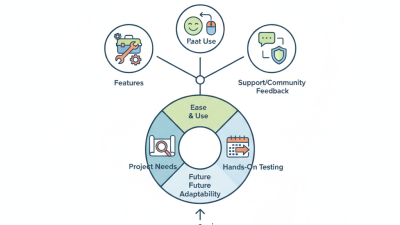


7 Tips for Choosing the Right CAD Rendering Service
Choosing a CAD rendering service can shape how clients understand a design before construction begins. Cad Rendering turns technical drawings into visual evidence, showing materials, lighting, scale, and spatial relationships. A polished image may reveal a cramped doorway, weak sightline, or confusing finish long before installation. That practical value makes provider selection more important than attractive sample galleries.
Not every studio works the same way. Some understand architectural documentation, while others mainly produce marketing images. An experienced team should ask about file formats, revision limits, deadlines, texture references, and intended image use. It should also explain how it protects project data and verifies details against the original drawings. Look for consistent portfolios, clear communication, realistic timelines, and feedback from identifiable clients or industry partners. Technical skill matters. So does listening.
The seven tips in this guide focus on those decisions. They cover portfolio relevance, software capability, communication, pricing, revisions, delivery reliability, and visual accuracy. A low quote can become expensive when missing details force repeated corrections. An impressive preview can also hide weak process control. I have seen projects lose momentum because lighting was approved before materials were confirmed. That mistake is easy to repeat. No service is perfect, and a thoughtful review should question its own assumptions. Choose a partner that can explain its workflow, accept useful criticism, and deliver images that support real decisions—not merely decorate a presentation.

Define Your CAD Rendering Goals and Project Requirements
Before choosing a CAD rendering service, define what the images must achieve. Are they for investor presentations, product pages, assembly instructions, or internal reviews? Each purpose needs a different visual treatment. A polished hero image may need dramatic lighting, while an engineering view requires visible joints and accurate proportions. I once wrote a vague rendering brief, and the first draft looked attractive but answered no practical questions.
Tip 1: Record your project requirements in measurable terms. List the CAD file format, target resolution, camera angles, materials, background style, and delivery date. Mark which dimensions cannot change. Include two or three reference images, even if they are imperfect. Clear evidence reduces guesswork and prevents expensive revisions.
Tip 2: Separate essential details from decorative choices. A transparent housing may need realistic reflections, but excessive gloss can hide internal parts. Decide whether the model needs animation, exploded views, close-up details, or several color options. Ask how many revision rounds are included. This matters when a small change affects every frame. Also confirm file handling procedures, approval checkpoints, and who verifies technical accuracy. A rendering can appear credible while still showing a misplaced screw or incorrect gap. That mistake is easy to miss on a bright screen.
Evaluate Rendering Quality, Technology, and Software Compatibility
7 Tips for Choosing the Right CAD Rendering Service
Tip 1: Inspect real samples, not polished galleries.
Ask for unedited viewport captures, final images, and revision histories. Compare edge sharpness, reflections, material texture, and small hardware details. A 2024 global 3D rendering market analysis reported that architectural visualization remains a major demand segment. Quality directly affects client approval. I once trusted a beautiful portfolio and missed inconsistent shadows between product views.
Tip 2: Test the technology with your own CAD file.
Confirm support for native geometry, assemblies, layers, textures, and accurate scale. Ask whether the service uses ray tracing, physically based materials, and calibrated color workflows. A 2023 industry survey found that over 60% of design teams still manage interoperability problems during project delivery. That number deserves attention. Request one paid test scene before signing a large contract.
Tip 3: Verify software compatibility in writing.
Check supported file formats, version limits, plug-ins, export settings, and cloud transfer methods. Open the returned files on your workstation. Do not assume compatibility.
Tip 4: Measure delivery performance.
Request sample render times for a comparable scene, including resolution and lighting complexity. A professional service should report revision rates, uptime, and response targets. Industry cloud-service reports commonly distinguish availability above 99.9% from weaker delivery promises. Ask what happens after a failed upload or corrupted file.
Tip 5: Review security controls.
Confirm access permissions, encrypted transfers, backup periods, and deletion procedures. Technical confidence is useful. It is not proof. Test communication with one detailed brief, then judge the questions you receive.
Compare Service Expertise, Industry Experience, and Portfolio Results
A CAD rendering service should prove more than visual polish. Compare its technical expertise, especially in materials, lighting, camera setup, and accurate product dimensions. Ask who handles modeling and rendering. Experienced artists should explain their workflow in clear, practical terms. Vague answers may signal limited knowledge. Request samples that match your product type, not only attractive showroom scenes.
Industry experience adds useful judgment. A service familiar with architecture, manufacturing, or consumer products may understand common design requirements. Check whether previous projects included similar materials, environments, and viewing angles. Review the portfolio for consistency across several projects. One impressive image proves little. Ask about measurable results, such as fewer design revisions, faster approvals, or stronger client presentations.
Look for a dependable process. Confirm file formats, revision limits, deadlines, and quality checks before work begins. Ask how the team protects confidential design files. Request two professional references when possible. Their comments may reveal missed deadlines or poor communication. Also compare the service’s response to a small test brief. It should show careful questions, not rushed confidence. No provider fits every niche. A clear admission of limits can be more trustworthy than perfect sales language. Review one weak portfolio example too, because mistakes often reveal how a team learns.
7 Tips for Choosing the Right CAD Rendering Service - Compare Service Expertise, Industry Experience, and Portfolio Results
| No. | Evaluation Dimension | What to Compare | Reliable Evidence to Request | Practical Verification Method | Common Warning Sign |
|---|---|---|---|---|---|
| 1 | CAD Rendering Expertise | Ability to interpret 2D drawings, 3D CAD models, assembly relationships, materials, tolerances, and design intent. | A technical portfolio showing product geometry, assemblies, exploded views, section views, and material-specific finishes. | Provide a controlled sample file and check whether the proposed workflow preserves dimensions, components, and required details. | The service focuses only on attractive images and cannot explain CAD structure, missing details, or technical limitations. |
| 2 | Industry Experience | Experience with the visual, regulatory, and communication requirements of the relevant sector, such as manufacturing, architecture, consumer products, or engineering. | Sector-specific project examples, anonymized case studies, and references that describe the project scope and deliverables. | Ask the provider to identify typical customer concerns, required views, material expectations, and approval stages for the target sector. | The portfolio contains unrelated visual styles but provides no evidence of understanding the intended market or application. |
| 3 | Portfolio Results | Image accuracy, lighting quality, material realism, camera composition, consistency across views, and suitability for the intended use. | High-resolution before-and-after examples, multiple views of the same product, technical cutaways, and examples delivered for print or digital use. | Review the portfolio at full size and compare edges, reflections, shadows, textures, labels, fasteners, and small mechanical features. | Only highly edited hero images are shown, with no consistent project sets or evidence that the visuals were based on accurate CAD data. |
| 4 | Software and File Compatibility | Supported CAD formats, rendering workflow, texture handling, color management, image resolution, and delivery formats. | A written list of accepted input files and deliverable formats, including raster, vector, layered, animation, or interactive outputs when required. | Confirm whether the provider can work with the exact file types, coordinate systems, units, naming conventions, and export requirements used by the project. | File compatibility is described vaguely, or conversion is required without a clear explanation of possible geometry and material losses. |
| 5 | Accuracy and Quality-Control Process | Methods used to check geometry, dimensions, camera views, materials, colors, lighting, annotations, and final image quality. | A review checklist, sample proofing process, marked-up revision procedure, and clear approval points before final delivery. | Request a low-resolution test render and compare it with the source CAD model before authorizing final high-resolution production. | There is no documented review stage, and corrections are handled informally after final delivery. |
| 6 | Project Schedule and Revision Policy | Estimated milestones, proofing time, number of included revisions, response times, and conditions that affect delivery dates. | A written statement of work with milestones, review deadlines, revision limits, change-order rules, and final delivery dates. | Ask for a schedule based on the actual number of products, views, animations, and approval participants in the project. | The provider promises an unusually short turnaround without defining review stages, project assumptions, or revision conditions. |
| 7 | Security, Ownership, and Commercial Fit | Confidentiality, ownership of source files and final images, storage practices, communication quality, pricing transparency, and scalability. | Confidentiality terms, data-retention policy, ownership clauses, itemized quotation, payment schedule, and named project contacts. | Confirm who can access uploaded CAD files, how long files are retained, what usage rights are transferred, and which services are included in the quotation. | The contract is unclear about intellectual property, portfolio use, data handling, extra revisions, or charges for source files. |
Review Pricing, Timelines, Communication, and Revision Policies
7 Tips for Choosing the Right CAD Rendering Service
Price should be clear before any modeling begins. Ask whether the quote includes scene setup, material adjustments, lighting, and final file formats. A low fee may exclude important work. I once accepted an attractive estimate that charged separately for simple camera changes. That mistake delayed the presentation and weakened the budget. Request a written breakdown, payment schedule, and possible extra charges.
Timelines should include review points, not only a final delivery date. A reliable service can explain how many working days each stage requires. Ask for a draft preview before detailed textures are added. This reduces expensive corrections later. Communication also needs structure. Confirm the project contact, response times, meeting frequency, and file-sharing method. Short weekly updates can reveal missing dimensions or unclear design decisions early. Silence is costly.
Revision policies deserve careful attention. Check how many rounds are included and what counts as a minor change. Moving a chair differs from redesigning an entire façade. Provide marked-up screenshots, reference images, and written comments. Clear feedback saves time for both teams. My own revisions have sometimes been vague, which created avoidable back-and-forth. That is worth admitting. Ask how urgent changes affect delivery and pricing. A professional provider should answer directly, document approvals, and flag risks before they become surprises.
Verify Security, File Handling, and Long-Term Service Reliability
Choosing a CAD rendering service is also a security decision, not only a visual-quality decision. Ask where files are stored, who can access them, and how access is logged. A credible provider should explain encryption, role-based permissions, multi-factor authentication, and breach notification procedures. The 2024 Data Breach Investigations Report recorded 30,458 incidents and 10,626 confirmed breaches. Third-party involvement doubled to 15 percent. Your service provider is part of that risk.
Request a written file-lifecycle policy. It should cover uploads, temporary rendering copies, backups, revisions, and verified deletion. Ask whether employees can download models onto local devices. Request access logs and deletion evidence for a sample project. The 2024 Cost of a Data Breach Report placed the global average breach cost at 4.88 million dollars. That is not a CAD-specific figure, but it makes casual file handling difficult to defend. Small gaps matter.
Reliability needs evidence beyond a polished website. Check the service-level agreement, recovery time objective, backup frequency, and support response times. Ask how the provider handled its latest outage. Test a non-sensitive file before sending production geometry. A common review mistake is trusting promises too quickly. I would still leave room for doubt: a signed policy cannot prove perfect behavior. Regular access reviews and documented deletion checks reveal more than confident sales language.
7 Tips for Choosing the Right CAD Rendering Service
Recommended allocation of review effort across security, file handling, and long-term service reliability.
Use this 100-point assessment model to compare CAD rendering providers. Give the greatest attention to data security, file transfer controls, access permissions, backup practices, service-level commitments, and the ability to retrieve or migrate files later.
Related Posts
-
How to Choose the Best Cad Rendering Software for Your Needs?
-

Top 5 3D Model Rendering Tips for Global Buyers
-
Maximizing Design Efficiency through Cad Rendering Technology Advantages in Modern Manufacturing
-

Navigating the 2025 Tech Landscape: Innovations in Best Exterior Rendering for Global Procurement
-

How to Improve Your Cad Rendering Skills for Stunning Visuals
-

7 Essential Reasons Why Best 3d House Rendering Elevates Your Architectural Projects